MRX Learning Center
Texas Comptroller County Appraisal District Directory Retrieval Provenance Worksheet
Create one blank provenance record for one authorized manual attempt through the official Texas Comptroller county directory without expanding into property or tax-record research.
Direct answer for mineral owners
Use one blank worksheet for one manual attempt through the official Texas Comptroller county index and one county page. Record exact routes, county code and name, access time, displayed section, update, contact, and taxing-unit labels, retained-evidence pointer, limitation, and located, not located, or unverified. Do not search property records or infer identity, accuracy, ownership, appraisal, tax, mineral value, or legal effect.
Key takeaways for mineral owners
- Use one worksheet ID for one official index route, one selected county page, and one manual retrieval attempt.
- Record only the section, update, contact, address, and active-taxing-unit labels the official page displays.
- Keep completed worksheets, screenshots, contact values, and retained evidence in an authorized controlled system.
- Treat located, not located, and unverified as attempt-level observations, not accuracy or property conclusions.
- Stop when access requires login, contact, submission, payment, CAPTCHA, bypass, scraping, or bulk collection.
- Send local appraisal, tax, title, ownership, mineral, valuation, and transaction questions to an appropriate human.
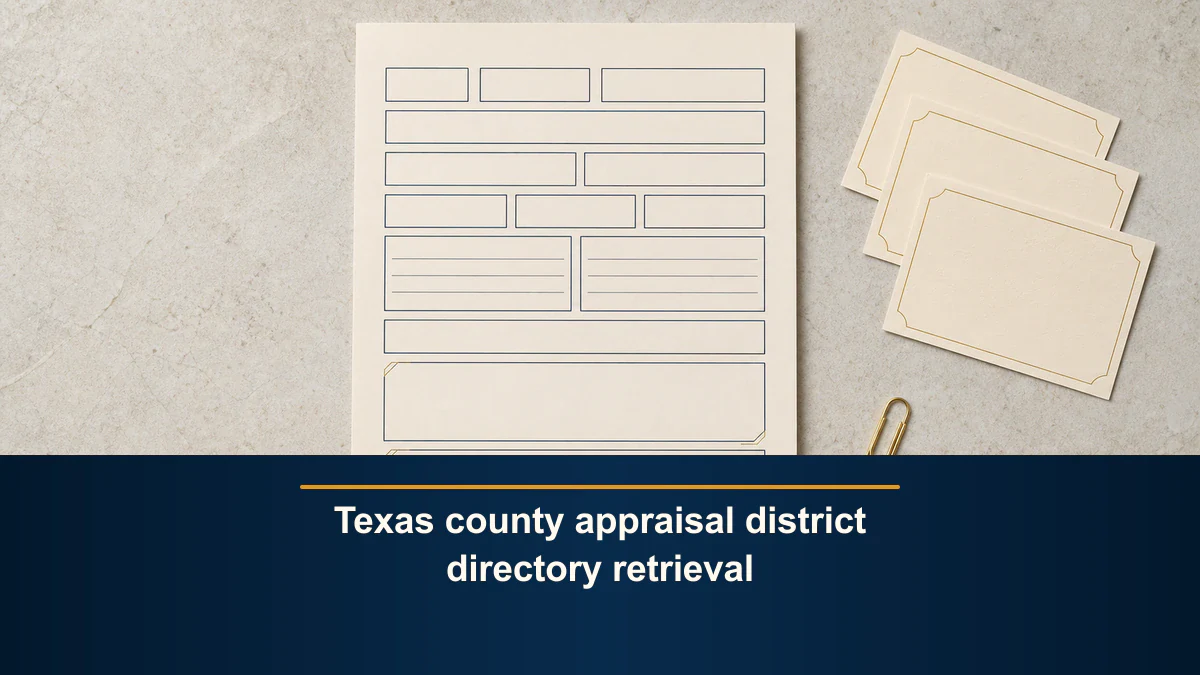
Directory-only boundary. This blank worksheet documents one authorized manual attempt through the official Texas Comptroller county directory and one selected county page. A displayed appraisal-district entry does not establish identity, authenticity, completeness, currency, certification, jurisdiction, service scope, property connection, title, ownership, mineral connection, appraisal, tax treatment, value, or legal effect. Keep completed worksheets, screenshots, contact values, and retained evidence in an authorized controlled system. MRX provides educational information and resources only and does not buy mineral rights.
A Texas county appraisal district directory retrieval can preserve where a contact entry came from without turning that entry into a property or tax record. The worksheet records one official route, one county page, the labels displayed during one access event, and what prevented a bounded result.
That separation matters when an inherited mineral-rights file includes a tax notice, county reference, or appraisal-district name. The Comptroller directory can help preserve the official contact route. It does not identify the owner of a mineral interest, search a local appraisal roll, explain a tax bill, or decide whether a contact or taxing unit is relevant to a tract.
Direct answer for mineral owners
Create one worksheet ID for one authorized manual attempt. Open the Texas Comptroller Local Property Appraisal and Tax Information directory, select one source-displayed county code and name, and preserve the official county-page route.Record the access timestamp and timezone; exact Appraisal District and Last Updated labels; displayed labels for the chief appraiser, taxpayer liaison, phone, toll-free number, fax, email, website, mailing address, and street address; displayed active-taxing-unit codes and names; a controlled retained-evidence pointer; a source limitation; and one outcome: located, not located, or unverified.
Stop there. Do not follow the local website into a property search, record request, appraisal review, tax inquiry, identity match, or transaction analysis. Do not call, email, submit, sign in, purchase, bypass, scrape, or bulk collect under this workflow.
Use one official index and one county page
The Comptroller directory states that the agency does not have access to local property appraisal or tax information and directs most local appraisal and property-tax questions to the county appraisal district or tax assessor-collector. It describes the directory as contact information for those offices plus the taxing units each serves.
That statement defines the job. Use the statewide directory only to preserve the official directory trail. Do not treat it as a statewide property, ownership, appraisal, or tax database.
Start a new worksheet ID or version when any of these changes:
- the official index route;
- the selected county code or name;
- the county-page route;
- the access timestamp or timezone;
- the source-displayed section or update label;
- the displayed contact or address field set;
- the active-taxing-unit display;
- the retained-evidence pointer;
- the source limitation; or
- the controlled outcome.
Do not merge entries from multiple counties, local websites, search engines, tax offices, appraisal systems, or retained documents. A later reviewer should be able to see which exact official page produced each observation.
Keep every reusable field blank
- Worksheet ID:
[controlled attempt ID] - Official directory index:
[exact HTTPS URL] - Selected county code and name:
[exact source display] - Official county-page route:
[exact HTTPS URL reached] - Access timestamp and timezone:
[authorized manual access time] - Appraisal-district section label:
[exact source display] - Last-updated label:
[exact source display or not stated] - Appraisal-district name label:
[exact source display or not stated] - Chief-appraiser label:
[exact source display or not stated] - Taxpayer-liaison label:
[exact source display or not stated] - Phone, toll-free, fax, email, and website labels:
[exact source display] - Mailing-address label:
[exact source display or not stated] - Street-address label:
[exact source display or not stated] - Active-taxing-unit codes and names:
[controlled retained record only] - Navigation or access state:
[exact source display] - Retained-evidence pointer:
[authorized locator] - Source limitation:
[exact display, not stated, or unresolved] - Controlled outcome:
[located, not located, or unverified] - Authorized-human handoff:
[role and bounded question]
The bracketed phrases are labels, not example values. Do not put a real or fictional owner, heir, estate representative, chief appraiser, taxpayer liaison, phone number, email, website, address, taxing unit, property, mineral interest, tax amount, offer, result, or conclusion into the reusable public worksheet or images.
Result limitation: keep this beside the outcome field. A displayed entry proves only that the recorded official page displayed the bounded directory section during the recorded access event. It does not establish accuracy, completeness, currentness, identity, officeholder status, jurisdiction, service scope, property connection, title, ownership, mineral connection, appraisal, tax treatment, value, or legal effect.
Preserve source-displayed fields without extending them
A representative official county page, such as the Comptroller’s Montgomery County directory page, shows the structure the worksheet is designed to preserve. The page includes an Appraisal District section, a Last Updated label, contact-field labels, mailing and street address sections, and an Active Taxing Units list.
Preserve the labels and values as source-displayed observations in the controlled record. Do not normalize a blank field into none, infer that a listed website is reachable, treat a displayed person as the current officeholder, or assume that the active-taxing-unit list is complete for a later purpose.
The directory says it is periodically updated with information reported by appraisal districts and tax offices. That is a source limitation. A displayed date or field does not authorize this worksheet to certify the entry or guarantee that later contact information remains unchanged.
Preserve three controlled outcomes
Use only these outcomes:
- Located: the official selected-county page displayed the bounded appraisal-district directory section during the documented attempt.
- Not located: the recorded official page did not display the bounded section during that attempt.
- Unverified: route identity, essential labels, access state, evidence retention, or another limitation prevented either bounded observation.
Do not convert located into accurate, complete, current, verified contact, correct jurisdiction, serves this property, owns this record, or can answer this mineral question.
Do not convert not located into no appraisal district, no tax office, no taxing unit, no property record, or no mineral interest. One page, label, route, or access event may be incomplete or unavailable.
Stop before property or tax-record research
The Comptroller’s Property Tax System Basics explains that local appraisal districts administer property appraisal functions and directs local-process questions to the local district. This worksheet does not perform those functions and does not contact the district.
Do not use this workflow to:
- search an appraisal roll or property account;
- enter an owner, heir, estate, address, parcel, legal description, or account number;
- retrieve a tax bill, certificate, receipt, protest, exemption, valuation, or appraisal record;
- compare a tax value with a mineral offer or sale estimate;
- infer ownership, title, heirship, probate status, or mineral connection;
- call, email, submit a form, create an account, or sign in;
- pay a search, access, document, or certification fee;
- bypass a CAPTCHA, rate limit, access control, or terms; or
- scrape or bulk collect directory or local records.
If the task changes from preserving the directory entry to requesting information or searching local records, close this worksheet and create a separately authorized workflow with its own purpose, access, privacy, evidence, and human-review rules.
Keep contact values and evidence controlled
The reusable public template needs no completed person name, office contact, phone number, email, website, address, taxing-unit list, screenshot, tax record, property identifier, estate detail, mineral description, appraisal, amount, offer, signature, or result.
Use one controlled retained-evidence pointer for the official page capture or note. Record only the pointer in the worksheet if the completed worksheet could be shared beyond the authorized team. Do not publish a directory capture as proof that a person, office, property, or mineral interest has been verified.
If an authorized reviewer later needs to contact an office, confirm a field, or search a local system, that later action needs a separate authorization and record. This retrieval worksheet ends before contact or submission.
Keep appraisal and mineral value separate
An appraisal-district directory entry does not appraise a mineral interest. It does not explain the basis of a tax value, identify a producing property, allocate ownership, model future production, calculate present value, or evaluate an offer.
Use why a Texas mineral tax value may not match a sale estimate for educational context about distinct valuation purposes. Use the retained evidence source-scope worksheet to document the scope of an artifact already retained. This article owns only the earlier directory-route provenance job.
Do not use the outcome to decide who owns mineral rights, whether a tax record is correct, whether title is clear, whether an appraisal is reliable, whether an offer is fair, or whether a transaction should proceed.
Stop at authorized-human review
Close the worksheet with the controlled outcome, limitation, unresolved question, and next authorized role. Do not answer the later question inside this retrieval record.
Questions about local appraisal records, tax bills, taxing-unit service, office contact, exemptions, protests, title, ownership, heirship, mineral connection, valuation, or transaction conduct require the applicable local office, qualified Texas tax or legal counsel, a title professional, or another appropriately qualified reviewer.
This worksheet documents one manual official-directory retrieval attempt. It does not provide legal, probate, tax, title, appraisal, valuation, investment, financial, identity-verification, offer, closing, or transaction advice.
Frequently asked questions
Does the directory search mineral or property records?
No. The directory provides office contact and served-taxing-unit information. A local appraisal or tax system is a separate source with a different purpose, fields, access rules, and evidentiary limits.
Can a displayed taxing-unit code be connected to my tract?
Not in this workflow. Preserve the code and name only as directory fields. Connecting a taxing unit to a property or mineral interest requires separate source evidence and qualified review.
What if a contact field is blank?
Record the source display as blank or not stated. Do not fill the gap from memory, a search result, a third-party directory, or a different county page.
What if the official page changes after I record it?
Use a new worksheet version or ID for the later access event. Preserve both access times, routes, displayed labels, retained pointers, and limitations without declaring which version is legally or factually controlling.
Can I use the local website linked from the directory?
The link can be preserved as a displayed directory field. Opening it for a property search, record request, contact, login, or submission is outside this worksheet and requires a separate authorized workflow.
Sources reviewed for this article
- Texas Comptroller: Local Property Appraisal and Tax Information county directory
- Texas Comptroller: Montgomery County directory page
- Texas Comptroller: Property Tax System Basics
Frequently asked questions
Does a located appraisal-district directory entry identify a property or owner?
No. Located means only that the official county page displayed the bounded directory section during the recorded attempt. The worksheet does not search or establish any property, owner, heir, estate, title, mineral interest, appraisal, or tax record.
Does the Last Updated label prove that every displayed field is current?
No. Preserve the label exactly as displayed. Do not convert it into a claim that each contact field is accurate, complete, verified, or current at the time someone later uses it.
Can one worksheet combine several counties?
No. Use one worksheet for one selected county page and one access event. A different county, route, access time, displayed field set, or result state requires a separate worksheet ID or version.
Should the public template contain actual contact details?
No. Keep contact values, screenshots, completed worksheets, and retained evidence in an authorized controlled record. The reusable public template and images should remain blank.
What if the route requires a login, form, payment, or CAPTCHA?
Record the access state and use unverified, then stop. This workflow does not authorize account creation, contact, submission, purchase, access bypass, scraping, or bulk collection.
Sources reviewed for this article
Related mineral-rights articles

Why Doesn’t My Texas Mineral Tax Value Match a Sale Estimate?
A Texas mineral tax value and a voluntary sale estimate can differ because they may describe different interests, dates, purposes, data, assumptions, and exclusions.
Read the post →
Mineral Rights Retained Evidence Source-Scope Worksheet
Build one blank source-scope record for one already-retained artifact without retrieving, interpreting, comparing, or deciding anything.
Read the post →
Reeves County Mineral Records: A Source-by-Source Search Log
Keep Reeves County Clerk, CAD, GLO, and RRC observations in separate evidence rows with their own routes, timestamps, search fields, displayed references, bounded results, and next questions.
Read the post →
How to Build an Andrews County Mineral Rights Public-Record Locator
An Andrews County public-record locator preserves the exact office or system, access route, search field, displayed identifier, access date, source limitation, and next request without turning a search result into proof.
Read the post →A practical next step
Put your mineral rights in context.
Every mineral interest, royalty history, and written offer is different. Start with a question, or share what you have for a free underwriter review.
- Free
- Confidential
- No obligation to sell
Ready for a closer look?
Review Related Inheritance GuidesGet a directional range with the assumptions clearly stated.